

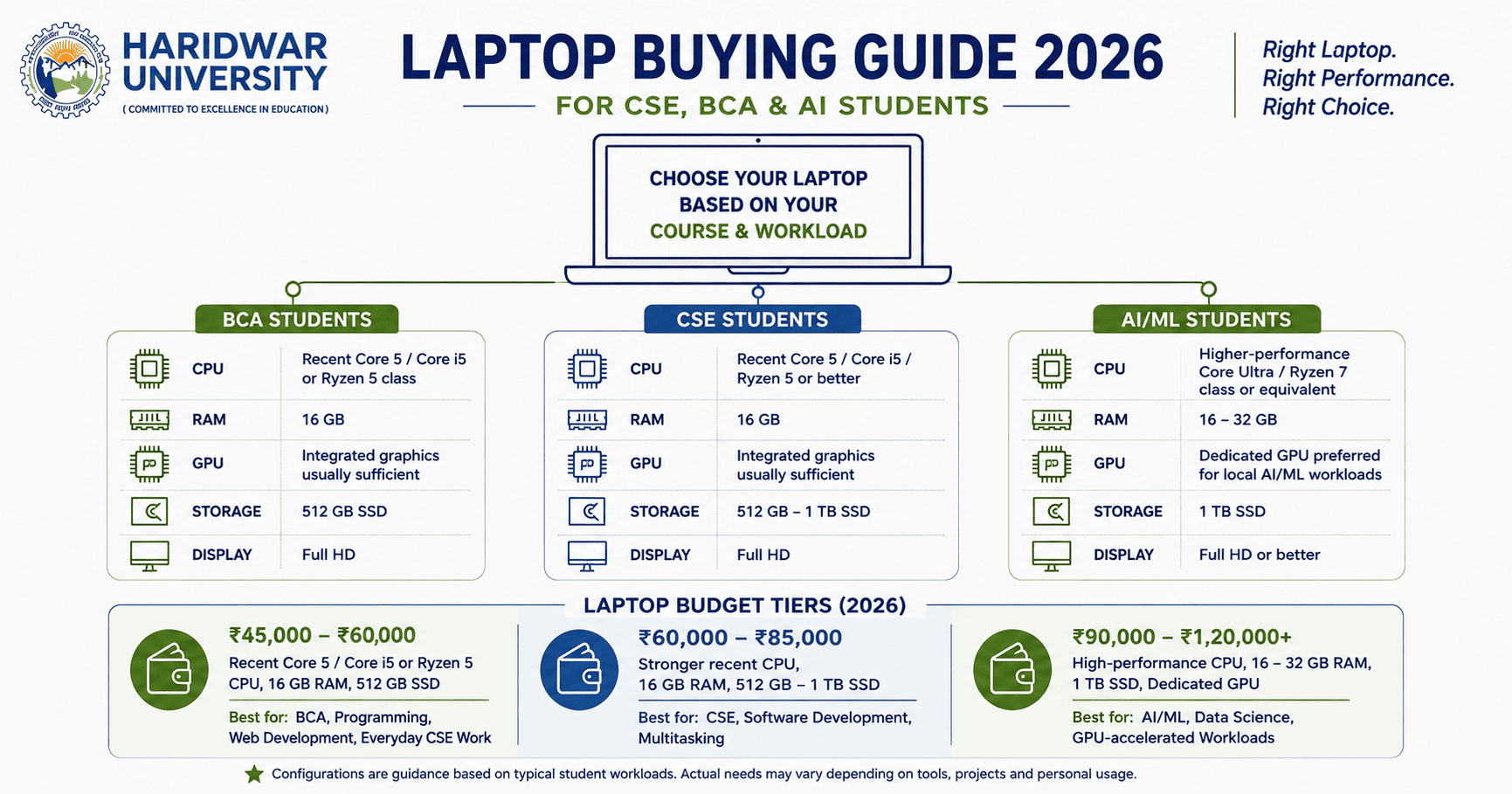
A laptop is no longer an optional extra for a computer science student. Programming environments, databases, web development, data analysis, documentation and AI tools all move onto the student's own machine sooner or later.
But there is a common buying mistake: choosing the laptop first and the workload second. A BCA student building web applications does not need the same configuration as an AI student training machine learning models locally. For most students, the right purchase is the one that leaves enough performance headroom without paying for expensive hardware they will rarely use.
Table of Contents
1. What Laptop Specifications Matter for CSE, BCA and AI Students?
2. Laptop Budget Tiers for Students in 2026
3. What Should CSE, BCA and AI Students Actually Buy?
6. Student Discounts and Buying Smart
7. Laptop Care Matters After the Purchase
1. What Laptop Specifications Matter for CSE, BCA and AI Students?
The four specifications worth checking first are CPU, RAM, GPU and SSD storage. For perspective, Microsoft's current Visual Studio development requirements recommend a minimum of 16 GB RAM for typical professional solutions and strongly advise installing development IDEs directly onto a high-speed SSD.
| Specification | BCA | CSE | AI / ML |
|---|---|---|---|
| CPU | Recent Core 5 / Core i5 or Ryzen 5 class | Recent Core 5 / Core i5 / Ryzen 5 or better | Higher-performance Core Ultra / Ryzen 7 class |
| RAM | 16 GB | 16 GB | 16–32 GB |
| GPU | Integrated graphics usually sufficient | Integrated graphics usually sufficient | Dedicated GPU preferred for local training |
| Storage | 512 GB SSD | 512 GB – 1 TB SSD | 1 TB NVMe SSD |
| Display | Full HD (1080p) | Full HD (1080p) | Full HD or higher (IPS/OLED) |
The Practical Rule: Prioritise RAM (16 GB baseline) and fast SSD storage before chasing a premium graphics card if your primary workload is coding, web development, data structures and algorithms, or general academic projects.
2. Laptop Budget Tiers for Students in 2026
These are specification-led planning tiers designed to help students and parents allocate budgets effectively:
| Budget Bracket | Target Configuration | Best Suited For |
|---|---|---|
| ₹45,000 – ₹60,000 | Recent Core 5/i5 or Ryzen 5 CPU, 16 GB RAM, 512 GB SSD | BCA, programming, web development, everyday CSE coursework |
| ₹60,000 – ₹85,000 | Stronger recent CPU, 16 GB RAM, 512 GB – 1 TB SSD | CSE, software engineering, VMs, Docker containers, multi-IDE development |
| ₹90,000 – ₹1,20,000+ | High-performance CPU, 16–32 GB RAM, 1 TB SSD, Dedicated GPU (RTX 40-series) | AI/ML, deep learning, computer vision, data science and GPU-accelerated tasks |
The price gap between the second and third tiers should be driven strictly by workload, not status. NVIDIA identifies GPU acceleration as crucial for large data processing and deep learning model training. That makes a dedicated GPU a sensible upgrade for AI/ML specialisation students, but not an automatic requirement for every CSE or BCA student.
3. What Should CSE, BCA and AI Students Actually Buy?
For BCA Students
A balanced laptop is more than enough for programming in Python, Java, C++, web technologies, relational databases and college coursework. Invest in 16 GB RAM, a reliable multi-core CPU and a 512 GB SSD rather than spending heavily on a dedicated GPU.
For CSE Students
The same 16 GB baseline works, but a stronger CPU (Core i5/i7 or Ryzen 5/7) and a 1 TB SSD become very useful as you handle multiple development environments, containerized services (Docker), virtual machines and larger engineering projects.
For AI / ML Students
When expecting to run TensorFlow, PyTorch or CUDA-accelerated models locally, a dedicated NVIDIA RTX GPU with adequate VRAM (6 GB+) substantially speeds up iteration times and reduces total dependence on cloud or lab resources.
4. Quick Decision Framework
Match your primary learning area with what hardware components to prioritize:
| If Your Main Work Is... | Prioritise |
|---|---|
| Web Development / Full Stack | CPU + 16 GB RAM + Fast SSD |
| Programming / DSA Problem Solving | CPU + 16 GB RAM + Good Keyboard & Display |
| Software Engineering / DevOps / VMs | Strong Multi-core CPU + 16/32 GB RAM + 1 TB SSD |
| Data Analytics & Visualization | CPU + 16 GB RAM + SSD Storage |
| Local Machine Learning / Deep Learning | Dedicated GPU + Dedicated VRAM + 16/32 GB RAM |
| Cloud-Based AI Tools (Colab / Kaggle / AWS) | 16 GB RAM + Multi-core CPU + Reliable Wi-Fi |
5. What Not to Overpay For
A higher specification is not automatically a better student laptop. Avoid paying extra for:
- 🚩 High-end gaming GPU: When your primary day-to-day task is writing and testing code.
- 🚩 32 GB+ RAM upfront: When your actual coursework can easily run on 16 GB (unless doing heavy ML).
- 🚩 4K or ultra-high refresh rate displays: That drain battery life rapidly without improving coding productivity.
- 🚩 Oversized internal storage: When external SSDs or cloud backup offer better cost efficiency.
- 🚩 Heavy gamer aesthetic designs: That add chassis weight, fan noise and compromise portability.
Key Checkout Question: “Will this specific component change what I can actually do and learn with this laptop over the next 3–4 years?” If the answer is no, reallocate those funds towards extended warranty coverage, RAM upgrades or quality accessories.
6. Student Discounts and Buying Smart
Before paying standard retail prices, always check official student education programs. Leading OEMs like Apple, Dell, Lenovo, HP and Asus offer education pricing and complimentary warranties to tertiary students upon verifying student ID or offer letters.
| Before Buying | What to Check |
|---|---|
| Warranty & ADP | Duration, onsite service and Accidental Damage Protection (ADP) terms |
| RAM Upgradeability | Whether RAM is soldered or has expandable SO-DIMM slots |
| SSD Slot | Presence of a secondary M.2 NVMe slot for easy future storage expansion |
| Battery Life | Realistic battery life (aim for 6+ hours of standard browsing/coding) |
| Display Quality | Full HD IPS panel with anti-glare coating and at least 300 nits brightness |
7. Laptop Care Matters After the Purchase
A good configuration can quickly degrade if neglected. To ensure your machine lasts your entire degree:
- Keep at least 15–20% free SSD space for seamless virtual memory swapping and OS performance.
- Install operating system and security patches regularly.
- Maintain automatic cloud backups (GitHub for code, Google Drive / OneDrive for project files).
- Avoid using laptops on soft beds to prevent blocked ventilation and thermal throttling.
- Use the original OEM charger or certified USB-C Power Delivery adapters.
8. Frequently Asked Questions (FAQs)
Q1: How much RAM does a CSE student need in 2026?
16 GB RAM is the practical baseline for most CSE students handling modern IDEs, databases, web browsers with multiple tabs, and local development servers.
Q2: Is 8 GB RAM enough for BCA students?
While 8 GB can manage basic coding and web browsing, 16 GB is strongly recommended to prevent sluggish performance when running developer IDEs alongside browsers and databases.
Q3: Do CSE students need a dedicated GPU?
Not necessarily. Modern integrated graphics (Intel Iris Xe / Intel Arc / AMD Radeon 600M/700M) are completely sufficient for programming, web development and data structures.
Q4: Do AI students need a dedicated GPU?
A dedicated NVIDIA RTX GPU is very helpful if you intend to train deep learning, neural networks and computer vision models locally. If relying strictly on cloud notebooks (Google Colab/Kaggle), high RAM and a fast CPU take precedence.
Q5: Is 512 GB SSD enough for college?
Yes, 512 GB NVMe SSD provides ample space for operating systems, development tools, SDKs and projects. Students managing large datasets or dual-booting Linux may prefer 1 TB.
Q6: What is a good laptop budget for CSE students in 2026?
A budget of ₹45,000 to ₹85,000 covers high-value configurations for almost all CSE workloads. AI/ML students with local GPU requirements should target ₹90,000 and above.
Q7: Should students buy a gaming laptop for AI or CSE?
Gaming laptops offer great GPU power per rupee, but be mindful of heavier weight, bulkier chargers, and shorter battery life. Compare these trade-offs against your daily campus commute.
Q8: Should I prioritise CPU, RAM or GPU when buying a student laptop?
For BCA and general CSE, prioritize CPU, 16 GB RAM and fast SSD storage. For local AI/deep learning model training, dedicated GPU capability becomes the deciding factor.
9. Your Laptop Supports the Learning Environment
A student's laptop is one piece of the computing ecosystem, complemented by institutional infrastructure. At Haridwar University, students have access to extensive computer engineering facilities, high-performance computing clusters, Virtual Lab resources and a dedicated AI & Deep Learning Lab equipped for Big Data Analytics and machine learning research.
Let your academic curriculum guide your laptop choice. Buy adequate performance for your 4-year journey, ensure portability and battery longevity, and avoid overpaying for unnecessary hardware.
Explore Computing & Engineering at Haridwar University
Discover our B.Tech CSE, AI & ML specialisations, and BCA programmes equipped with industry-aligned laboratories and tech internships.