

Department of Computer Science & Engineering | AI Workflow Guide
Architecting structured, verified, and responsible generative AI workflows for engineering problem solving, software synthesis, and technical documentation.
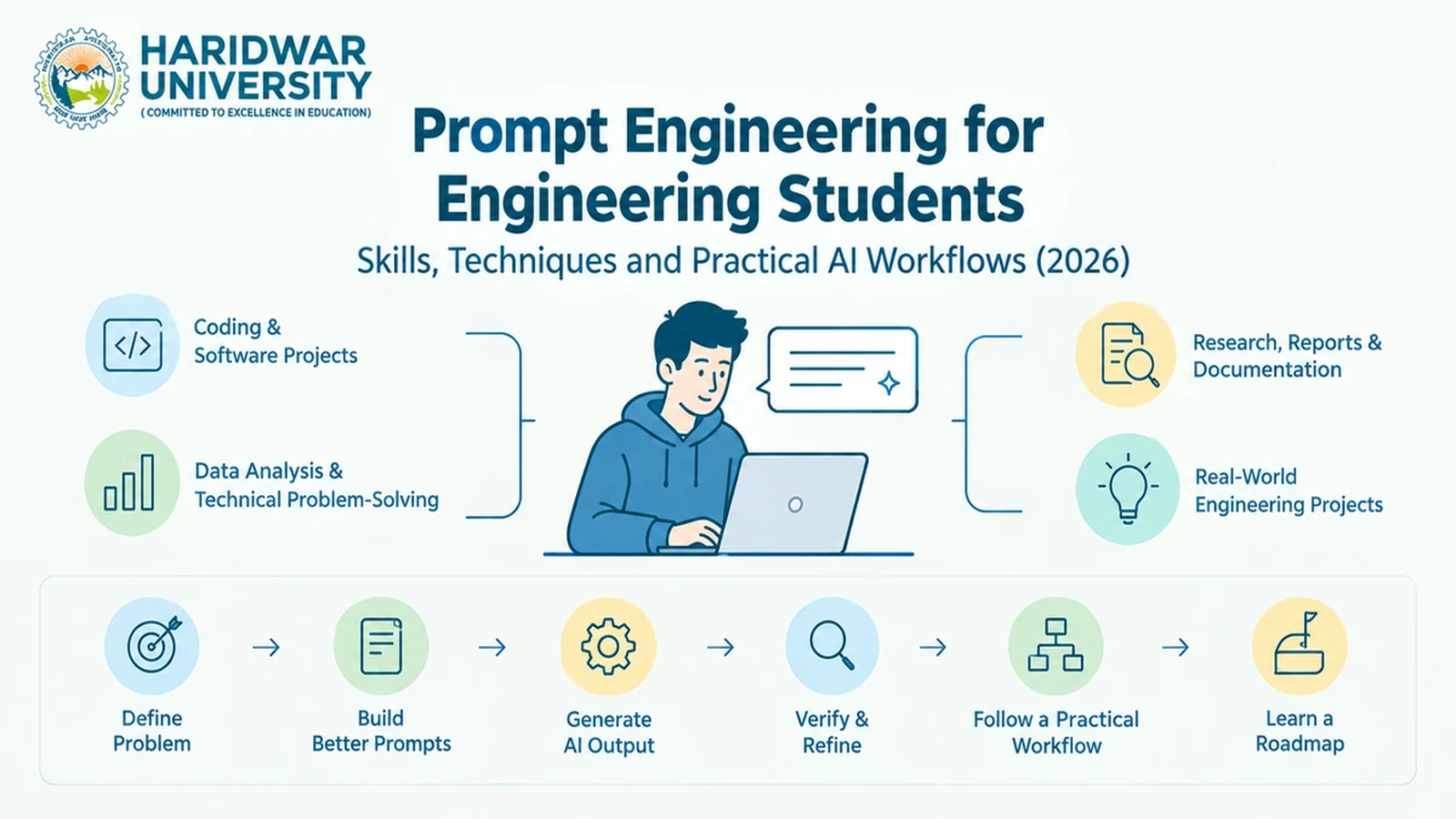
Prompt engineering is most useful to engineering students when it is treated as a technical workflow rather than a collection of clever sentences.
When I review student work involving generative AI, I look for a simple chain: What is the engineering problem? What information did the student provide? What constraints were defined? How was the AI output tested? What was changed after testing?
That distinction matters because a well-written prompt can improve relevance and structure, but it does not make an AI-generated answer automatically correct. AWS describes prompt engineering as crafting and optimising inputs for large language models, while Google Cloud recommends clear, specific and contextual instructions.
For engineering students, the practical skill is therefore not simply writing longer prompts. It is learning how to translate a technical problem into a structured AI task and then verify the result.
Table of Contents
- What Prompt Engineering Means for Engineering Students
- The Core Prompt Engineering Skills Students Need
- Build Better Prompts Around the Engineering Problem
- Use Prompt Engineering for Coding and Software Projects
- Use Prompt Engineering for Data Analysis and Technical Problem-Solving
- Use Prompt Engineering for Research, Reports and Documentation
- Apply Prompt Engineering Techniques Through Practical Examples
- Follow Prompt Engineering Best Practices for Reliable Results
- Verify and Refine AI Output Before Using It
- Build a Prompt Engineering Workflow for Engineering Projects
- Create a Practical Prompt Engineering Learning Roadmap
- Frequently Asked Questions (7 In-Depth FAQs)
1. What Prompt Engineering Means for Engineering Students
Prompt engineering is the practice of designing and refining instructions given to an AI model so that the resulting output better matches a defined task, context and format. The exact approach depends on the model, task and data.
For an engineering student, the difference between a weak and useful prompt can be seen immediately:
2. The Core Prompt Engineering Skills Students Need
Prompt engineering combines communication with technical judgement. IBM identifies techniques such as zero-shot and few-shot prompting, while AWS highlights context, instructions, specificity, experimentation, and guardrails.
1. Problem Formulation
Defining unambiguous technical goals (e.g., “Classify API network log anomalies into 4 discrete threat levels”).
2. Context Ingestion
Providing relevant data schemas, column definitions, environment constraints, and sample inputs.
3. Constraint Enforcement
Restricting assumptions (e.g., “Use Python standard library only; no external package dependencies”).
4. Output Serialization
Demanding structured return formats (valid JSON schemas, Markdown tables, or TypeScript interfaces).
3. Build Better Prompts Around the Engineering Problem
I recommend that students in our computing labs organize every prompt using a 6-part architectural skeleton:
Consider a data-analysis project. Instead of asking:
“Analyse this CSV.”
A more useful prompt could specify the dataset purpose, column definitions, expected analysis, restrictions, and output format.
For example:
“Analyse this student-performance dataset. Identify missing values, categorical variables, and possible target leakage. Do not train a model yet. Return findings in a table with the columns "issue," "evidence," and "recommended action.”
The prompt has a defined boundary. The student can then inspect whether the AI actually followed it.
Google Cloud similarly recommends contextual prompts and clear instructions, while AWS notes that effective prompting depends on the task and data.
4. Use Prompt Engineering for Coding and Software Projects
Software development is one of the clearest engineering applications. IBM documents use cases including code generation, debugging, API integration and software-engineering tasks.
Students can use prompts to:
- understand unfamiliar code
- generate an initial function
- identify likely bugs
- create test cases
- explain an API
- refactor repetitive code
- generate documentation
- compare implementation approaches
- break a large feature into smaller tasks
I recommend treating generated code as a candidate implementation, not as verified software.
Requirement → AI-generated approach → Code → Test cases → Debugging → Human review
For a final-year project, the important evidence is not that an AI tool produced 200 lines of code. It is whether the student understands those lines, can explain the design decisions and can demonstrate that the implementation works.
For broader project selection, students can also refer to HU's 25 Final-Year Project Ideas for CSE & AI/ML Students.
5. Use Prompt Engineering for Data Analysis and Technical Problem-Solving
Prompting can support several stages of data work:
- Understand the dataset and its columns.
- Identify missing or inconsistent values.
- Suggest an exploratory analysis sequence.
- Generate candidate Python or SQL operations.
- Explain statistical or model outputs.
- Compare possible approaches.
- Identify assumptions requiring human verification.
For example:
“Given these five columns and the project objective, identify potential target leakage before suggesting a machine-learning model. Explain each suspected leakage path.”
This is more useful than asking an AI system to “build the best model”.
Students should also understand that AI output can vary between runs. AWS explicitly notes the stochastic nature of LLM generation, meaning the same prompting approach does not guarantee identical responses.
HU's Python Libraries for Machine Learning guide can be used alongside this workflow when students need to decide which Python tools belong in their data or ML pipeline.
6. Use Prompt Engineering for Research, Reports and Documentation
Research work benefits from structured prompts, but this is also where verification becomes particularly important.
I would use AI for tasks such as:
- turning a broad topic into research questions
- structuring a literature-review workflow
- comparing methodologies
- extracting specified information from supplied papers
- creating a report outline
- improving technical documentation
- converting project notes into a consistent format
I would not treat an AI-generated citation, experimental result or technical claim as verified simply because it is presented confidently.
A useful research prompt can specify:
Source material → Question → Extraction fields → Evidence requirement → Output format
For example:
“Using only the supplied papers, create a table containing dataset, model, evaluation metric and reported limitation. If a field is not stated, mark it as ‘not reported’.”
That constraint makes the output easier to audit.
HU's recent NLP project guide similarly stresses defined problems, credible datasets, rigorous evaluation and realistic scope when students design AI projects.
7. Apply Prompt Engineering Techniques Through Practical Examples
Different techniques address distinct engineering challenges:
IBM documents zero-shot, few-shot and other structured prompting approaches, while Google Cloud recommends breaking complex tasks down and iterating on prompts.
For students, I would learn the simpler techniques first. A complicated prompting pattern is not automatically better than a clear instruction with the right context.
8. Follow Prompt Engineering Best Practices for Reliable Results
Production systems demand reliability. Engineering students should adhere to these 10 best practices:
- Isolate Objectives: Address one discrete function or transformation per prompt.
- Provide Compact Context: Exclude irrelevant code snippets that pollute the model’s attention window.
- Set Negative Constraints: Explicitly declare what the model must not do.
- Specify Serialization Standards: Standardize on JSON, YAML, or Markdown tables.
- Decompose Complex Logic: Employ prompt chaining rather than monster 1,000-word prompts.
- Supply Few-Shot Exemplars: Give at least one clear input-output example for non-trivial outputs.
- Enforce Guardrails: Protect against prompt-injection when deploying apps that accept public user input.
- Never Leak Secrets: Strip API keys, passwords, and private tokens before submitting prompts.
- Version Control Prompts: Commit prompt templates as text/YAML files alongside application code.
- Always Verify Outputs: Treat AI completions as untrusted input that requires automated unit testing.
AWS specifically recommends unambiguous instructions, adequate context, appropriate scope and iterative experimentation.
For systems exposed to untrusted user input, students also need to understand prompt-injection risks. AWS Prescriptive Guidance describes prompt injection as attempts to manipulate LLM instructions and recommends security controls around LLM inputs and application guardrails.
9. Verify and Refine AI Output Before Using It
This is the step that separates prompting from responsible engineering practice.
I use the following loop:
First output → Inspect → Identify failure → Refine → Test → Final output
The verification method depends on the task.
AWS notes that prompt refinement can help reduce hallucinations, while also pointing to approaches such as RAG when models need access to relevant external information.
The principle is simple: prompt quality improves the input-output process; verification establishes whether the output is usable.
10. Build a Prompt Engineering Workflow for Engineering Projects
For a semester project, I recommend turning individual prompts into a repeatable workflow:
Define → Contextualise → Constrain → Generate → Inspect → Refine → Test → Document
This is particularly useful when the same type of task is repeated.
For example, a coding project might maintain prompt templates for:
- requirements analysis
- code review
- test generation
- debugging
- documentation
The student can then version these prompts alongside the project rather than treating them as disposable chat messages.
This approach also connects naturally with modern AI project development. HU's Generative AI Project Ideas for Students distinguishes structured LLM applications, RAG, agents, fine-tuning and multimodal systems according to the problem being solved.
11. Create a Practical Prompt Engineering Learning Roadmap
Students can develop professional competency across 7 progressive stages:
Stage 1: Fundamentals
Task clarity and contextual scoping.
Stage 2: Constraints
Formatting outputs into JSON and schemas.
Stage 3: Few-Shot
Exemplar-driven instruction designs.
Stage 4: Domain Workflows
Code debugging and data pipelines.
Stage 5: Verification
Automated unit and integration testing.
Stage 6: Prompt Chaining
Multi-step templated workflows.
I would measure progress by what the student can produce, test and explain, not by how many prompting terms they can memorise.
At Haridwar University, our advanced computing laboratories provide students with access to high-performance computing clusters and API credits to experiment responsibly with generative AI models.
12. Frequently Asked Questions
1. What skills are needed for prompt engineering?
Problem specification, contextual reasoning, clear instructions, constraint setting, output design, iterative refinement and verification are the core skills. Programming becomes increasingly useful when prompting is applied to coding, data analysis or AI application development.
2. How can engineering students learn prompt engineering?
Start with simple technical tasks, then practise structured prompts for coding, data analysis, research and documentation. Compare outputs, identify failures and refine the instructions rather than collecting large numbers of prompt examples.
3. Can I learn prompt engineering for free?
Yes. Students can learn the fundamentals through freely available documentation and educational resources. The important part is practising with real technical tasks and evaluating the resulting outputs.
4. How long does it take to learn prompt engineering?
Basic prompting can be learnt quickly, but reliable technical use requires continued practice. The useful milestone is being able to formulate a task, constrain the output, test it and refine the workflow.
5. Do engineering students need programming to learn prompt engineering?
Not for basic prompting. Programming becomes important when prompts are used within software-development, data-analysis or AI-application workflows.
6. Can prompt engineering help with coding and engineering projects?
Yes. AI models can assist with code generation, debugging, explanation, documentation and other software-engineering tasks. The generated output still needs technical review and testing.
7. Is prompt engineering still a useful skill for engineering students?
Prompt engineering remains useful as part of working effectively with generative AI, but I would not treat it as an isolated replacement for programming, mathematics, domain knowledge or software-engineering fundamentals. The stronger skill is combining clear prompting with technical judgement and verification.
Master Applied Artificial Intelligence at Haridwar University
Learn cutting-edge generative AI, machine learning, and cloud computing with hands-on lab access, expert mentorship, and comprehensive placement training in Roorkee.