

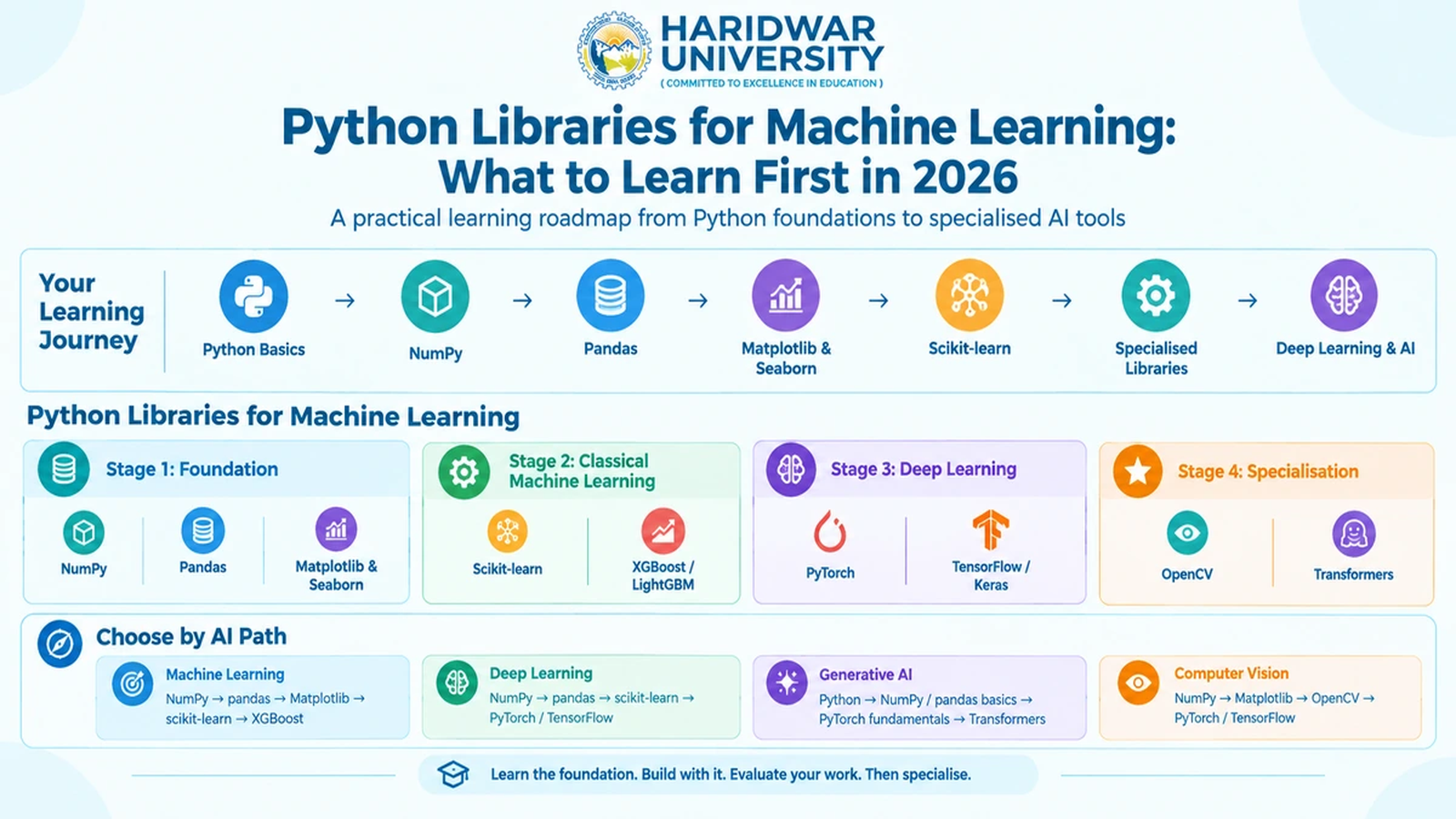
Python Libraries for Machine Learning: What to Learn First in 2026
Dr. Rohit Kumar
Head, Computer Applications, Haridwar University
Roorkee College of Smart Computing | Python Machine Learning Roadmap
A student learning roadmap moving systematically from foundational numerical tools to deep learning, computer vision, and modern AI.
Learning Python for machine learning does not become easier when you collect a longer list of packages. In my experience mentoring computing and engineering students, the more useful question is: which Python libraries for machine learning should a student learn first, and which can wait?
A student working through NumPy, pandas, scikit-learn, and visualization tools is building a durable foundation. PyTorch, TensorFlow, OpenCV, and Transformers become genuinely useful as the project moves towards deep learning, computer vision, or modern generative AI. The order matters because each layer solves a fundamentally different problem.
“Treat Python libraries for machine learning as a progressive learning path rather than a disconnected checklist. Learn each library when you encounter an engineering problem that actually requires it.”
Table of Contents
1. Python Libraries for Machine Learning: The Learning Order at a Glance
2. NumPy Builds the Numerical Foundation
3. Pandas Turns Raw Data Into Something You Can Analyse
4. Matplotlib and Seaborn Make Model Behaviour Visible
5. Scikit-learn Is the Core Machine Learning Toolkit
6. XGBoost and Other Boosting Libraries Come After the Basics
7. PyTorch and TensorFlow Belong to the Deep Learning Stage
8. OpenCV and Transformers Are Specialisation Libraries
9. Learn the Core Libraries First; Add Specialised Tools by Problem
10. Choose Your Python Libraries by the AI Path You Want to Follow
11. How to Turn Python Libraries Into Practical Machine Learning Projects
12. Frequently Asked Questions (FAQs)
13. Choosing a Python Learning Path That Scales & Academic Pathways at HU
1. Python Libraries for Machine Learning: The Learning Order at a Glance
There is no single package that covers the complete machine learning lifecycle. Trying to install and master every package simultaneously leads to cognitive overload and superficial understanding. The practical sequence is:
I recommend thinking about this sequence in terms of concrete tasks and stages:
| Stage | Libraries | Main Purpose |
|---|---|---|
| Numerical foundation | NumPy | N-dimensional arrays, vectorised mathematical operations, linear algebra. |
| Data preparation | pandas | Data cleaning, imputation, transformation, and tabular DataFrame analysis. |
| Visual analysis | Matplotlib, Seaborn | Exploring distributions, correlations, loss curves, and confusion matrices. |
| Classical ML | scikit-learn | Model training, feature scaling, cross-validation, pipelines, and evaluation metrics. |
| Advanced ML | XGBoost, LightGBM | Gradient-boosted decision trees for competitive tabular benchmarks. |
| Deep learning | PyTorch, TensorFlow/Keras | Neural network architectures, GPU acceleration, automatic differentiation. |
| Computer vision | OpenCV | Image filtering, transformations, video processing, and feature extraction. |
| Modern NLP & GenAI | Transformers (Hugging Face) | Pre-trained Transformer models, tokenizers, fine-tuning, and inference pipelines. |
2. NumPy Builds the Numerical Foundation
I always advise students to master NumPy before attempting machine learning algorithms. NumPy provides multidimensional arrays and vectorised numerical routines that form the core computational engine of scientific Python.
Its official documentation highlights the ndarray as the central data structure, giving developers direct control over array shape, memory layout, data types, and broadcasting semantics.
1D vectors, 2D matrices, and N-dimensional tensors.
Extracting rows, columns, and boolean masks without loops.
Element-wise arithmetic implemented in compiled C code.
Matching shapes for matrix multiplications and batching.
3. Pandas Turns Raw Data Into Something You Can Analyse
Once NumPy makes matrix calculations intuitive, pandas becomes the everyday workhorse for real-world projects. Real engineering datasets do not arrive as tidy numerical matrices; they contain missing records, inconsistent datetime strings, categorical labels, and noisy headers.
Pandas provides Series and DataFrame structures designed specifically for structured data manipulation. For machine learning students, these specific skills are critical:
| Skill | Why It Matters for Machine Learning |
|---|---|
| Reading CSV/Excel/Parquet data | Starting real-world projects and importing raw external benchmarks. |
| Selecting and filtering subsets | Isolating target classes, filtering outliers, and handling train/test splits. |
| Missing-value handling (imputation) | Preparing imperfect datasets without dropping valuable training instances. |
| Grouping and aggregation (groupby) | Discovering cohort trends and domain patterns across categories. |
| Merging and joining datasets | Combining multiple relational tables into a unified feature matrix. |
| Feature creation & encoding | Creating polynomial terms, binning, and one-hot encoding categorical variables. |
| Descriptive statistics (.describe()) | Understanding skewness, standard deviation, and quartile distributions. |
The practical student test: Download a raw, uncleaned public dataset (such as an open census, healthcare, or housing file) and write a python script to clean, transform, and output a pristine modeling matrix without copying a tutorial line by line.
4. Matplotlib and Seaborn Make Model Behaviour Visible
A machine learning model can easily output an accuracy metric of 0.88, but that raw number rarely reveals what actually happened. Did the model memorize the majority class? Are there outliers skewing the loss function? Are certain classes consistently misclassified?
Matplotlib provides foundational static, animated, and interactive plotting capabilities across figures and axes. Seaborn builds on top of Matplotlib to provide high-level statistical plotting. Students should be comfortable producing:
Exploratory Data Analysis Plots
- Feature distribution histograms
- Feature-target scatter plots
- Correlation heatmaps (Spearman & Pearson)
- Categorical box and violin plots
Model Performance Plots
- Normalized confusion matrix displays
- ROC-AUC and Precision-Recall curves
- Training vs. validation loss curves
- Residual error scatter plots (for regression)
5. Scikit-learn Is the Core Machine Learning Toolkit
This is where numerical arrays, cleaned dataframes, and visual analysis coalesce into real predictive engineering. Scikit-learn should be the first serious machine learning library every computer science student learns.
Rather than treating algorithms as disconnected equations, scikit-learn enforces a coherent, standardized API based on fit(), transform(), and predict(). I teach students to master the ML workflow in this exact 10-step sequence:
- Train/Test Splitting: Establishing strict evaluation splits before touching model parameters.
- Preprocessing: Scaling numerical features (StandardScaler, RobustScaler) and encoding labels.
- Feature Selection & Transformation: Reducing dimensionality (PCA) and eliminating collinearity.
- Regression Workflows: Linear regression, Ridge, Lasso, and ElasticNet baselines.
- Classification Workflows: Logistic regression, SVMs, Decision Trees, and Random Forests.
- Clustering & Unsupervised Analysis: K-Means, DBSCAN, and hierarchical clustering.
- Model Selection: Systematic hyperparameter tuning using GridSearchCV and RandomizedSearchCV.
- Cross-Validation: K-fold and Stratified K-fold cross-validation to assess variance.
- Metrics Evaluation: F1-Score, Balanced Accuracy, Precision, Recall, MAE, and RMSE.
- Scikit-learn Pipelines: Chaining preprocessing and estimation into leakage-free reproducible pipelines.
Scikit-learn's official documentation also strongly advises using isolated environments (such as venv or conda) to avoid dependency conflicts. Mastering this full pipeline gives students a durable competitive advantage over peers who jump into deep learning libraries without understanding baseline modeling.
6. XGBoost and Other Boosting Libraries Come After the Basics
Once a student has constructed and evaluated classical linear and tree-based models, gradient boosting libraries like XGBoost and LightGBM become worth exploring.
The critical element is timing. Do not introduce gradient boosting simply because it wins Kaggle competitions. Introduce it when you can evaluate it against a baseline model and clearly explain why its sequential error correction improves performance on your specific data:
| Experiment Stage | Purpose of the Comparison |
|---|---|
| 1. Logistic / Linear Baseline | Establish a defensible lower-bound performance reference. |
| 2. Single Decision Tree | Observe nonlinear decision boundaries and diagnose overfitting. |
| 3. Random Forest Ensemble | Evaluate parallel bagging and variance reduction across trees. |
| 4. XGBoost / LightGBM | Explore sequential gradient boosting, regularisation, and leaf-wise splitting. |
| 5. Final Held-Out Evaluation | Compare test accuracy, inference latency, and compute cost across all models. |
7. PyTorch and TensorFlow Belong to the Deep Learning Stage
Frameworks like PyTorch and TensorFlow/Keras belong to the deep learning phase, when modeling requirements transition from tabular feature vectors to unstructured inputs like raw images, speech audio, and sequence data.
PyTorch's tensor documentation explains that tensors are conceptually similar to NumPy arrays, but with two transformative superpowers: they can execute on GPU hardware accelerators and they support automatic differentiation (autograd) for gradient backpropagation.
Core Deep Learning Competencies to Master:
Do not abandon scikit-learn too soon. A student who understands train/test splits, stratification, and confusion matrices will master PyTorch or TensorFlow much faster than someone trying to learn data hygiene and neural mechanics simultaneously.
8. OpenCV and Transformers Are Specialisation Libraries
Not every student needs every library in their environment. Specialization should be dictated by your specific capstone project domain:
| If Your Project Involves... | Explore These Packages |
|---|---|
| Image processing and video streams | OpenCV (cv2) |
| Deep learning computer vision | PyTorch + torchvision (or YOLO/Ultralytics) |
| Text classification (classical) | scikit-learn (TF-IDF + LinearSVC) |
| Modern NLP & Language Models | Hugging Face Transformers + tokenizers |
| Retrieval-Augmented Generation (RAG) | Transformers, LangChain / LlamaIndex, Chroma / FAISS |
| Generative AI & Fine-Tuning | Hugging Face PEFT, LoRA, bitsandbytes, trl |
9. Learn the Core Libraries First; Add Specialised Tools by Problem
My recommended tiered prioritization for university students is:
NumPy → pandas → Matplotlib → scikit-learn
These four give a student the indispensable ability to manipulate tabular data, explore distributions, train predictive models, and objectively benchmark results.
PyTorch / TensorFlow → XGBoost
Adopted when moving into deep learning neural architectures or competitive gradient-boosted tabular benchmarks.
OpenCV → Transformers → PEFT
Selected strictly based on project requirements (e.g. computer vision pipelines, natural language processing, or generative AI).
| Student Academic Level | Practical Technical Focus |
|---|---|
| Beginner (Year 1–2) | NumPy, pandas, Matplotlib data manipulation. |
| Early Machine Learning | scikit-learn linear and tree-based workflows. |
| Applied Machine Learning | XGBoost, LightGBM, and hyperparameter tuning. |
| Deep Learning | PyTorch or TensorFlow for neural modeling. |
| Computer Vision | OpenCV + deep learning vision architectures. |
| NLP & Generative AI | Transformers + deep learning foundation + RAG tooling. |
10. Choose Your Python Libraries by the AI Path You Want to Follow
Instead of one monolithic list, structure your technical growth around four defined career and research specializations:
1. Machine Learning Track
Path: NumPy → pandas → Matplotlib → scikit-learn → XGBoost
Best for: Predictive analytics, financial modeling, healthcare risk forecasting.
2. Deep Learning Track
Path: NumPy → pandas → scikit-learn → PyTorch / TensorFlow
Best for: Complex neural networks, sequence modeling, scientific computing.
3. Generative AI Track
Path: Python → NumPy/pandas → PyTorch → Transformers → RAG
Best for: Knowledge assistants, LLM fine-tuning, autonomous agents.
4. Computer Vision Track
Path: NumPy → Matplotlib → OpenCV → PyTorch / torchvision
Best for: Drone surveillance, medical imaging, autonomous robotics.
11. How to Turn Python Libraries Into Practical Machine Learning Projects
Once students understand the basic syntax of these libraries, they must stop treating them as isolated classroom subjects. Use them together in a unified, end-to-end engineering workflow:
This is also why project work matters so fundamentally. Our recent 20 Machine Learning Projects for Beginners guide follows this exact principle by connecting datasets, tools, evaluation metrics, and project difficulty rather than presenting disconnected ideas.
Students preparing for final-year work can also explore:
- HU's 15 Deep Learning Project Ideas for Final-Year Students – Neural modeling, CNNs, and deep architectures.
- HU's Generative AI Project Ideas for Students 2026 – RAG, AI agents, and parameter-efficient fine-tuning (PEFT).
- HU's Natural Language Processing Project Ideas (20 Projects) – From text classification to Transformers.
- HU's 25 Final-Year Project Ideas for CSE & AI/ML Students – Complete guide to problem scope and rubric scoring.
- HU's B.Tech AI/ML vs CSE Guide – Comparing specialized AI vs. broader computing curricula.
At Haridwar University, our AI & Innovation Laboratories provide students with dedicated high-performance GPU computing clusters to train, evaluate, and benchmark these Python libraries on real-world datasets.
12. Frequently Asked Questions (FAQs)
1. Which Python library should I learn first for machine learning?
Start with NumPy and pandas, then learn Matplotlib and scikit-learn. This gives you a practical foundation before moving into specialised frameworks.
2. Are Python libraries for machine learning difficult for beginners?
The individual libraries are manageable when learned through small tasks. The difficulty usually comes from combining data preparation, modelling and evaluation into a complete workflow.
3. Is pandas necessary for machine learning?
For many tabular-data workflows, pandas is extremely useful because it provides data structures and tools for cleaning, transforming and analysing data.
4. Should I learn PyTorch or TensorFlow first?
Choose based on your intended coursework and projects. More importantly, understand neural-network fundamentals, tensors, training, validation and evaluation before focusing heavily on framework-specific features.
5. When should I learn Transformers?
Learn Transformers after developing a foundation in Python, data handling and machine learning or deep learning. Hugging Face's documentation supports both inference with pre-trained models and fine-tuning workflows.
6. Do I need to learn every Python library used in AI?
No. A student needs a dependable core stack and then adds libraries according to the problem being solved. Learning ten libraries superficially is less useful than being able to complete and explain a project with four or five.
7. Can these Python libraries help with final-year projects?
Yes. The useful approach is to select the project first, identify its data and modelling requirements, and then choose the libraries that support that workflow. This produces a more defensible project than selecting a library first and searching for a problem afterwards.
13. Choosing a Python Learning Path That Scales & Academic Pathways at HU
I would not measure student progress by the number of Python packages installed in an environment. A much stronger milestone is being able to take an unfamiliar dataset, understand its structure, clean it, train a baseline, evaluate the result with rigor, and explain every architectural decision.
For university students, the practical order remains simple: learn the foundation, build with it, evaluate your work, then specialise.
Related Technical Project Guides at Haridwar University:
- HU's 20 Machine Learning Projects for Beginners – Datasets, code, and learning paths.
- HU's 15 Deep Learning Project Ideas for Final-Year Students – Neural networks, CNNs, and evaluation workflows.
- HU's Generative AI Project Ideas 2026 – RAG, AI agents, and parameter-efficient fine-tuning.
- HU's Natural Language Processing Project Ideas – Text classification, NER, and Transformers.
- Computer Vision Projects for Students – OpenCV, YOLO, and visual inspection.
- HU's 25 AI Projects for Engineering Students – Traditional AI, heuristics, and predictive models.
- HU's 25 Final-Year Project Ideas for CSE & AI/ML Students – Comprehensive project themes and scoring.
- HU's B.Tech AI & ML Programme Guide 2026 – Honors degree pathways, GPU labs, and industry curriculum.
- Cloud Computing Projects for Students – Deploying machine learning containers to AWS, Azure, and GCP.
- Cybersecurity Project Ideas for Students – Threat modeling, log analysis, and defensive AI.
- Blockchain Project Ideas for Students – Smart contracts and decentralized consensus.
- Robotics Projects for Engineering Students – Hardware integration and ROS robotics pipelines.
- IoT Project Ideas: Sensor-to-Cloud – MQTT telemetry and smart connected devices.
Build Real Machine Learning Systems at Haridwar University
Master Python, classical machine learning, deep neural networks, and generative AI with state-of-the-art GPU computing clusters and expert faculty guidance at Haridwar University.