

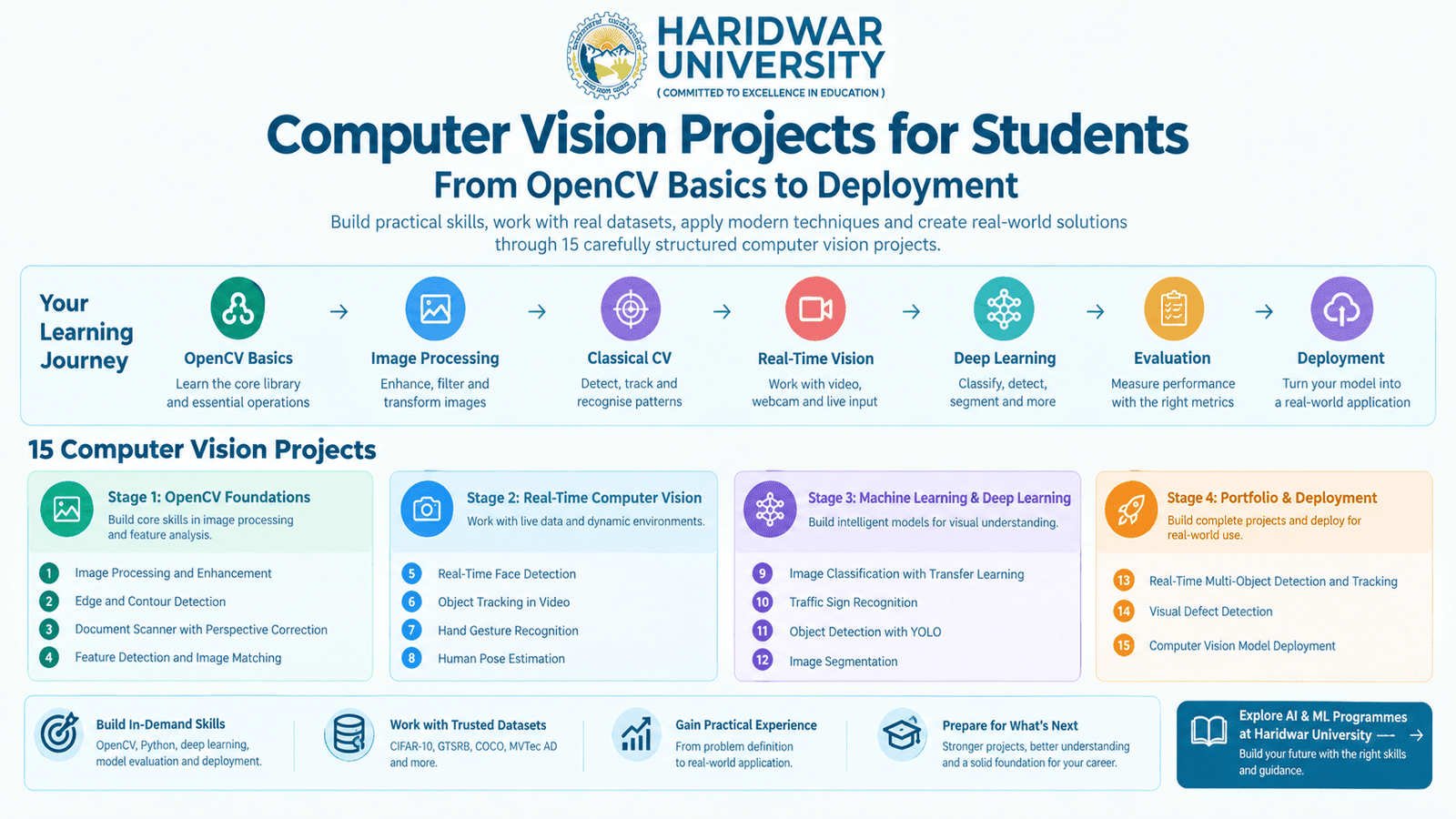
Computer Vision Projects for Students: From OpenCV Basics to Deployment
Dr. Himanshu Verma
Head of CSE, Haridwar University
Roorkee College of Smart Computing | Computer Vision Roadmap
Bridging classical image processing, deep learning pipelines, and production edge deployment.
Computer vision becomes easier to learn when a student stops treating it as a collection of libraries and starts treating it as a sequence of problems. I have found that the most useful project progression is not from a simple project to a complicated project merely for the sake of complexity. It is from understanding an image, extracting useful information, recognising objects, evaluating the result, and finally putting the system somewhere it can actually be used.
OpenCV is a sensible starting point because its Python tutorials cover practical foundations such as colour spaces, geometric transformations, thresholding, smoothing, gradients, Canny edge detection, contours, template matching, and segmentation. From there, students can move into machine learning, transfer learning, object detection, segmentation, and real-time applications. This guide brings that progression together through 15 computer vision projects rather than presenting another unstructured list of ideas.
Table of Contents
1. What Computer Vision Projects Should Students Build First?
2. How to Choose a Computer Vision Project (7-Question Matrix)
3. 15 Computer Vision Projects for Students (Stages 1 to 4)
4. How OpenCV Fits Into a Computer Vision Learning Path
5. How to Evaluate a Computer Vision Project
6. How to Move a Computer Vision Project from Model to Deployment
7. What to Demonstrate in a Computer Vision Project (10-Point Checklist)
1. What Computer Vision Projects Should Students Build First?
I would begin with projects where the visual problem is easy to see and the processing steps can be explained. Image enhancement, edge detection, and document scanning are useful because a student can inspect the input, change one operation, and immediately see what happened.
That distinction matters. A student who jumps directly into a large object-detection model may produce an impressive demo without understanding why preprocessing, data quality, or evaluation affect the result.
For final-year students, I recommend thinking about the project as an engineering system rather than a model alone. This is also the approach I use when discussing broader final-year project ideas for CSE and AI/ML students at Haridwar University.
2. How to Choose a Computer Vision Project
Before selecting a topic, I would ask seven foundational questions. This checklist prevents a common student mistake: choosing a project because its title sounds advanced. A smaller project that is understood, evaluated, and documented is usually easier to defend than an oversized project assembled from copied code.
| Question | What to Check |
|---|---|
| 1. What is the visual problem? | Classification, detection, segmentation, tracking, OCR, or pose estimation. |
| 2. What data do I have? | A named public dataset, live camera input, or responsibly collected custom images. |
| 3. What technique fits? | OpenCV classical algorithms, transfer learning, or custom deep detection/segmentation networks. |
| 4. What computing resources are available? | CPU, GPU availability, RAM constraints, and training epoch duration. |
| 5. How will I evaluate it? | Accuracy, Precision/Recall, F1-score, IoU, mAP, FPS, or latency. |
| 6. Can I demonstrate it? | Static test images, recorded video streams, interactive webcam feeds, or a web UI. |
| 7. What can I add later? | Better data augmentation, benchmark comparison, latency optimisation, or edge deployment. |
My earlier AI project guide for engineering students makes the same broader point: project selection should always consider skill level, available time, and the intended learning outcome.
3. 15 Computer Vision Projects for Students
Stage 1: OpenCV Foundations
Master core pixel manipulations, transformations, edge detections, and feature matching using pure OpenCV.
1. Image Processing and Enhancement
BeginnerBuild a Python application that performs resizing, colour-space conversion (BGR, RGB, HSV, Grayscale), smoothing/blurring filters, adaptive thresholding, and histogram equalization. OpenCV's official image-processing documentation provides these operations as core learning exercises.
2. Edge and Contour Detection
BeginnerUse Canny edge detection and contour hierarchy algorithms to identify shapes, geometric boundaries, or object silhouettes in photographs. OpenCV specifically provides tutorials for both Canny edges and contours, demonstrating how gradients reveal structural lines.
3. Document Scanner with Perspective Correction
Beginner to IntermediateCreate a system that identifies the four corners of a sheet of paper photographed at an acute angle and applies a 4-point perspective warp to generate a bird's-eye scanned document. This is an exceptional exercise because geometric transformation, adaptive thresholding, and contour approximation merge into a cohesive pipeline.
4. Feature Detection and Image Matching
IntermediateBuild a system that detects keypoints and extracts visual descriptors (such as ORB, SIFT, or AKAZE) in an inquiry image and matches them with a reference image using FLANN or Brute-Force Matchers with Lowe's ratio test. This moves the student from raw pixels to invariant visual representations.
Stage 2: Real-Time Computer Vision
Transition from static images to live camera feeds, video processing, landmark extraction, and spatial analysis.
5. Real-Time Face Detection
Beginner to IntermediateBuild a live webcam application that detects human faces in real time using Haar Cascade Classifiers or OpenCV's DNN Face Detector (SSD/ResNet-10). The project teaches students the critical difference between batch image manipulation and continuous stream processing.
6. Object Tracking in Video
IntermediateSelect an object in a video stream with a bounding box and track its trajectory across sequential frames using OpenCV tracking algorithms such as CSRT, KCF, or Optical Flow (Lucas-Kanade).
7. Hand Gesture Recognition
IntermediateUse 21 hand landmarks to recognise gestures such as open palms, thumbs-up, or peace signs. Google's MediaPipe Hand Landmarker supports still photos, pre-recorded video, and live video streams, outputting exact landmark coordinates and handedness (left vs. right).
8. Human Pose Estimation
IntermediateBuild a posture analysis or exercise repetition-counting application using skeletal landmarks. MediaPipe Pose Landmarker predicts 33 full-body landmarks in image coordinates and 3D world space.
Stage 3: Machine Learning and Deep Learning
Harness convolutional neural networks, transfer learning, multi-class benchmarks, YOLO detection, and pixel-level segmentation.
9. Image Classification with Transfer Learning
IntermediateTrain an image classifier using a pretrained CNN (such as ResNet-18, MobileNetV3, or EfficientNet) rather than initializing weights from scratch. PyTorch's official vision documentation demonstrates both feature extraction and fine-tuning. For a controlled benchmark, CIFAR-10 provides 60,000 colour images across 10 distinct classes.
10. Traffic Sign Recognition
IntermediateBuild a classifier that identifies road signs from automotive camera imagery. The German Traffic Sign Recognition Benchmark (GTSRB) contains over 50,000 images across 43 classes under varied lightings, rotations, and partial obstructions, making it ideal for studying data augmentation and class imbalance.
11. Object Detection with YOLO
AdvancedObject detection answers two questions simultaneously: what objects are present, and where are they located? COCO benchmarks define the standard for bounding-box detection across 80 categories. Students can begin with pretrained YOLO weights, run inference across videos, and fine-tune on a custom domain dataset (such as campus safety helmets or vehicle types).
12. Image Segmentation
AdvancedInstead of drawing a rectangular box around an object, semantic and instance segmentation identify the exact pixels belonging to each region. This is the natural progression after detection, forming the foundation of autonomous driving scene parsers and medical imaging diagnostics.
Stage 4: Portfolio and Deployment
Integrate multiple models, tackle industrial anomaly challenges, and package computer vision models into production endpoints.
13. Real-Time Multi-Object Detection and Tracking
AdvancedCombine high-speed detection (such as YOLO) with tracking algorithms (such as ByteTrack or DeepSORT) to detect multiple objects and preserve their unique track IDs across camera frames. The important learning outcome is explaining how detection intervals, Kalman filters, and Hungarian matching interact when an object is momentarily obstructed.
14. Visual Defect Detection
AdvancedBuild an industrial automated inspection system that identifies subtle anomalies or manufacturing defects in materials. The MVTec AD dataset is ideal for this: it contains more than 5,000 high-resolution images across 15 industrial textures and objects, featuring defect-free training images, defective test images, and pixel-precise anomaly ground truth.
15. Computer Vision Model Deployment
AdvancedTake one completed vision model and transform it into an interactive system accessible by others. This can be a web interface (FastAPI + Streamlit), desktop application, or edge device runtime. Modern frameworks like Ultralytics support seamless export into ONNX, OpenVINO, and TensorRT engines.
4. How OpenCV Fits Into a Computer Vision Learning Path
OpenCV is best understood as part of the overall engineering toolkit, not as the entire field of computer vision. A structured learning progression ensures students build solid foundations before wrestling with model fine-tuning:
This progression mirrors the curriculum philosophy at Haridwar University, where computer vision sits alongside machine learning, deep learning, and natural language processing in the Roorkee College of Smart Computing. For a broader perspective on modern AI degree specialisations, explore our B.Tech AI & ML programme guide.
5. How to Evaluate a Computer Vision Project
A working demo is not the same as a properly evaluated engineering project. An examiner or tech lead wants to know the limits of your system. You should report standard quantitative metrics tailored to your problem domain:
Classification Metrics
Accuracy, Precision, Recall, F1-score, and a confusion matrix showing inter-class confusion.
Detection Metrics
Intersection over Union (IoU), Mean Average Precision ([email protected] and [email protected]:0.95), and false discovery rate.
Segmentation Metrics
Mean IoU (Jaccard Index) and Dice Similarity Coefficient across foreground and background masks.
Real-Time Metrics
Frames Per Second (FPS), end-to-end pipeline latency (ms), and frame drop rate during heavy multi-object tracking.
Always document failure cases: Include examples where the model fails. A confusion matrix, difficult edge-case test images, and failure analyses often tell the examiner more about your understanding than a single aggregate accuracy figure.
6. How to Move a Computer Vision Project from Model to Deployment
Once the model produces reliable predictions on validation data, the next question is where it will run in practice. A sensible architectural progression is:
For a student project, deployment can be as straightforward as wrapping a trained PyTorch model in a lightweight FastAPI backend or Streamlit interface. More advanced final-year projects can explore export formats supported by Ultralytics (such as ONNX, OpenVINO, and TensorRT) and measure throughput differences before and after quantization.
7. What to Demonstrate in a Computer Vision Project
When I review a student project at Haridwar University, I want to see much more than a terminal output or a single bounding box on an image. A rigorous presentation must cover 10 core engineering aspects:
- Problem statement: Exactly what visual problem are you solving, and who benefits?
- Data sourcing: Where did the images or video originate? Are sources, licencing, and ethics documented?
- Preprocessing: What transformations, colour normalisations, or augmentations were applied, and why?
- Technical method: Why did you choose classical OpenCV, transfer learning, YOLO, or a segmentation network?
- Baseline comparison: What happens with a simpler heuristic or standard default model?
- Evaluation: Which domain-specific metrics were used, and on what test split?
- Failure cases: Under what lighting, occlusion, or camera angles does the system struggle?
- Demonstration: Can an examiner interactively test the system on unseen video or webcam input?
- Limitations: What does the project not prove, and where are the operational boundaries?
- Future scope: What architectural or data improvements would you pursue with additional time?
This checklist marks the distinction between demonstrating a piece of copied code and presenting a defensible engineering project. Our Research & Innovation overview and advanced Computing Laboratories provide the infrastructure where students develop these projects into formal research papers and patent disclosures.
8. Frequently Asked Questions (FAQs)
1. Which computer vision project is best for beginners?
Image processing, edge detection, and document scanning are sensible starting points because the student can directly observe the effect of each computer-vision operation on pixel matrices.
2. Is OpenCV enough to build a computer vision project?
OpenCV can support many image-processing and real-time vision projects, but modern computer vision also encompasses machine learning, deep learning, detection, segmentation, and modern deployment runtimes.
3. Which computer vision projects are suitable for final-year students?
Projects such as transfer-learning classification, traffic-sign recognition, object detection, segmentation, visual defect detection, and real-time detection with tracking provide substantial technical scope when properly defined, benchmarked, and evaluated.
4. Should students use a public dataset or collect their own images?
Either approach can work. A recognised benchmark dataset (such as COCO or GTSRB) is often easier to reproduce and evaluate, while a carefully collected custom dataset can make a project more domain-specific. In both cases, document data provenance, ethical consent, preprocessing, and limitations.
5. Should I include source code in a computer vision project?
Yes, where appropriate, but source code should support the project rather than replace fundamental understanding. Students must be able to explain the core algorithms, hyperparameter choices, and evaluation metrics behind the implementation.
6. What programming language is commonly used for computer vision projects?
Python is the most practical choice for student projects because OpenCV, PyTorch, MediaPipe, and YOLO provide mature Python interfaces and vast ecosystem support. C++ remains prevalent for ultra-low latency edge runtimes.
7. Do I need a powerful GPU to start computer vision?
No. Fundamental OpenCV and classical image-processing projects run smoothly on standard CPUs. Training large deep learning networks may require GPU acceleration, which is why students should verify compute requirements before committing to an advanced vision topic.
9. Building Beyond the Project Idea at Haridwar University
I encourage students to choose the project they can understand, measure, and defend, not simply the one with the most impressive title. Computer vision provides a natural progression from manipulating pixels with OpenCV to training neural networks that classify, detect, or segment visual information, and ultimately deploying those models into production systems.
The strongest computer vision project is not necessarily the most complicated one. It is the one where the problem statement is clear, the data is defensible, the technical method is appropriate, the evaluation is honest, and the limitations are understood.
If you want to build these foundations through structured curriculum study and practical project work, you can explore the B.Tech CSE with AI & ML specialisation at Haridwar University, complete with dedicated industry live projects, leading placement training via our Placement Cell, and vibrant student societies supported by Student Welfare Services.
Accelerate Your AI & Computer Vision Engineering Career
Join Haridwar University's Department of Computer Science & Engineering. Learn in state-of-the-art computing laboratories under experienced faculty mentorship.