

System Design for Beginners: What Freshers Should Know for Interviews
Dr. Himanshu Verma
Associate Professor & HOD, Computer Science & Engineering, Haridwar University
A software application is more than the code that makes its buttons work. Behind every login, search result, online payment or course-registration request, several components communicate to process information and deliver a response. Understanding how these components fit together is the starting point of system design for beginners.
For freshers, the subject can appear intimidating because many tutorials introduce distributed systems, microservices, database sharding and large-scale architecture at once. These are useful topics, but they are not the right starting point for everyone.
I encourage students to begin with a more practical question: Can you explain how a simple application works, identify its main components and justify the choices you make? That foundation is more valuable than memorising the architecture of a platform you have never built.
Table of Contents
- 1. What System Design Means in Software Engineering
- 2. Why System Design Matters for Freshers
- 3. HLD and LLD: Understanding the Difference
- 4. Core System Design Concepts Beginners Should Learn
- 5. A Six-Step Approach to Solving a Design Problem
- 6. A Simple System Design Example for Freshers
- 7. Preparing for System Design Interviews as a Beginner
- 8. Frequently Asked Questions (FAQs)
- 9. Building Your System Design Foundation
1. What System Design Means in Software Engineering
System design is the process of deciding how different parts of a software application will work together. It covers the application's structure, components, communication, data storage, performance, security and reliability.
Consider a student portal. A student logs in, checks the available courses and submits a registration request. The visible screen is only one part of the application. A typical design may also involve:
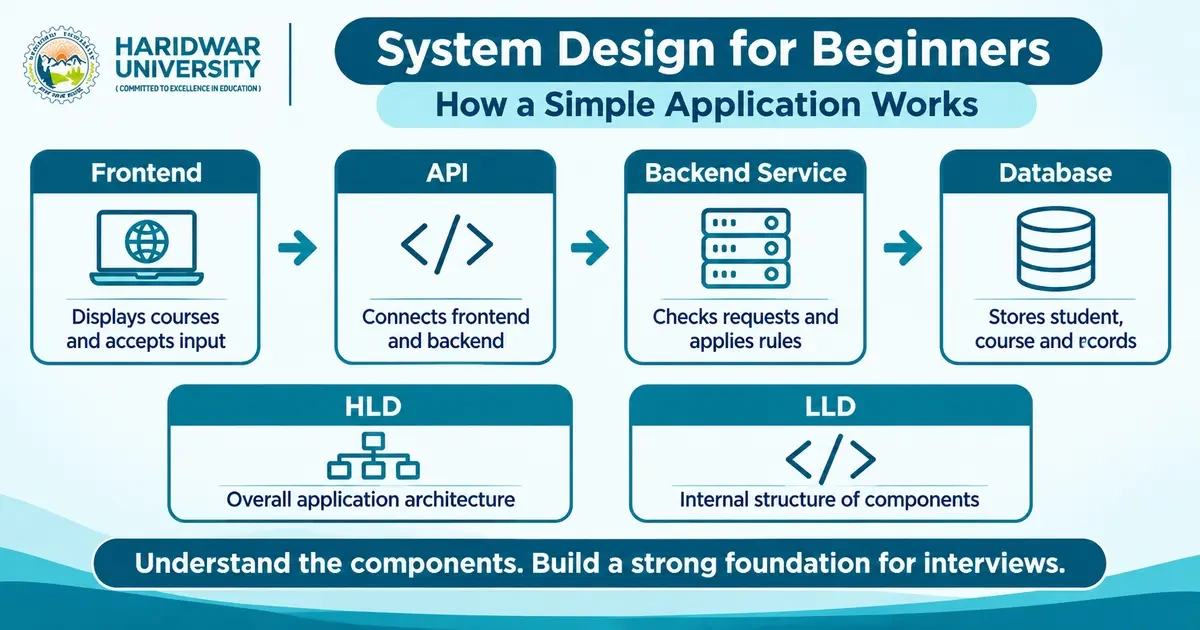
- Frontend: Displays information and accepts user input.
- Backend: Processes requests and applies application rules.
- API: Defines how the frontend and backend exchange information.
- Database: Stores student details, course records and registrations.
- Authentication: Checks whether a user is permitted to access an account or action.
The system designer decides how these components interact and what should happen when something goes wrong.
I use a simple distinction when explaining the subject: programming focuses on implementing individual instructions and functions; system design considers how the complete application should be organised to meet its requirements.
2. Why System Design Matters for Freshers
System design helps students connect subjects that are often studied separately. Programming teaches logic, data structures help organise information, databases manage records, and computer networks explain communication. System design brings these ideas into one working application.
It also helps candidates explain their academic projects. If an interviewer asks how a project handles user information, where records are stored or how the frontend communicates with the backend, a student with basic design knowledge can give a structured answer.
However, freshers should understand the difference between useful preparation and a universal interview requirement. Interview formats vary by company and role. Some entry-level assessments concentrate mainly on programming, data structures and problem-solving; others may include basic architecture, project-design discussions or a simple system-design exercise.
"A fresher does not need to design an internet-scale platform. The first responsibility is to explain a sensible design, understand its limitations and communicate the reasoning behind it."
3. HLD and LLD: Understanding the Difference
Two terms appear frequently in system design tutorials: High-Level Design (HLD) and Low-Level Design (LLD). They describe different levels of detail.
| Aspect | High-Level Design (HLD) | Low-Level Design (LLD) |
|---|---|---|
| Main focus | Overall application architecture | Internal structure of components |
| Typical elements | Services, databases, APIs and communication | Classes, methods, interfaces and relationships |
| Main question | How do the major parts work together? | How should an individual part be implemented? |
| Common representation | Architecture or component diagram | Class diagram or sequence diagram |
For a student portal, an HLD diagram might show a browser communicating with a backend service, which then accesses a database. An LLD diagram might show the Student, Course and Registration classes, including their attributes and methods.
Neither is automatically more important in every interview. The expected depth depends on the problem and the position. A beginner should understand the purpose of both before attempting complex design exercises.
4. Core System Design Concepts Beginners Should Learn
I recommend learning a small group of connected concepts before moving towards advanced architecture patterns.
1. Client-server architecture
The client is the application or device making a request. The server receives that request, processes it and returns a response. A web browser requesting a student's course list is a straightforward example.
2. APIs and communication
An Application Programming Interface (API) defines how software components communicate. For example, a frontend may send a request to retrieve course details. The backend processes it and returns the required data.
3. Databases
A database stores and organises information so that an application can retrieve or update it. Freshers should understand tables, records, primary keys, relationships and basic SQL operations. They should also know that relational and non-relational databases serve different data and application requirements.
4. Caching
A cache keeps frequently accessed information in a faster storage layer, reducing repeated requests to the primary data store. A student portal might cache a course catalogue that many users view but that changes relatively infrequently. Cached information must still be managed carefully so that outdated data is not presented as current.
5. Load balancing
When an application runs across multiple servers, a load balancer distributes incoming requests between them. This can help prevent one server from receiving all the traffic. It becomes relevant when a single server is no longer sufficient.
6. Scalability and reliability
Scalability is the ability of a system to accommodate changing demand. Vertical scaling increases the resources of an existing machine; horizontal scaling adds more machines or instances. Reliability concerns whether the application continues to provide its intended service when components fail.
For further reading, Google's patterns for scalable and resilient applications explain how caching, scaling and resilience work together. AWS also outlines performance design principles for building systems that respond to changing workloads.
5. A Six-Step Approach to Solving a Design Problem
When a design question is presented, I advise students not to start by naming technologies. First understand the problem. A simple six-step method provides a more reliable structure.
- Clarify the requirements: Identify the users and the main purpose of the application. Ask what it must do.
- List the essential features: Separate necessary functions from optional additions.
- Identify the data: Determine what information must be stored, retrieved or updated.
- Draw the main components: Show the client, backend, APIs and database where relevant.
- Explain the request flow: Describe how information moves between components and how the application responds.
- Discuss limitations and improvements: Consider security, performance, reliability and what may need to change as usage grows.
This approach also gives the interviewer an opportunity to understand the candidate's reasoning. A clear diagram and a justified decision are more useful than a list of fashionable technology names.
6. A Simple System Design Example for Freshers
Suppose an interviewer asks you to design a basic student course-registration system.
Start by identifying three essential requirements: students should be able to view available courses, register for a course and see their registration status.
A simple design could contain:
- Frontend: Displays the course list and registration form.
- Backend service: Checks the request and applies registration rules.
- Database: Stores student, course and registration records.
- API: Connects the frontend to the backend.
The request flow is straightforward. A student selects a course and submits the form. The frontend sends the request to the backend through an API. The backend checks whether the student and course records exist and whether registration is permitted. If the checks pass, it stores the registration in the database and returns a confirmation.
Now consider a practical limitation: two students might try to register for the final available seat at almost the same time. The system must prevent the available-seat count from becoming incorrect. This introduces the need to understand database transactions and concurrency.
That is the value of a good beginner exercise. It begins with a small application but gives the candidate a reason to explore real engineering decisions.
7. Preparing for System Design Interviews as a Beginner
A fresher's preparation should be progressive. I would organise it into three stages rather than asking students to study every advanced topic at once.
| Stage | What to study | Practical exercise |
|---|---|---|
| Foundation | Programming, OOP, DBMS, APIs and client-server architecture | Explain how a login request works |
| Application | HLD, LLD, databases, caching and basic scaling | Draw a course-registration system |
| Interview practice | Requirements, diagrams, trade-offs and project explanation | Practise a URL shortener or basic chat application |
For programming and data-structure preparation, students can follow HU's semester-wise coding practice roadmap for placements. The guide connects coding practice with core computer science revision and technical project discussions.
I also recommend revisiting concepts through active practice rather than repeatedly reading definitions. HU's guide to the active recall method for engineering students explains how students can test their understanding by reproducing diagrams, algorithms and explanations without looking at notes.
Students pursuing computing programmes can also explore the B.Tech Hons. CSE programme at Haridwar University and its wider Roorkee College of Smart Computing academic programmes.
8. Frequently Asked Questions (FAQs)
1. Is system design difficult for beginners?
It can seem difficult when tutorials begin with advanced distributed systems. Start with client-server architecture, APIs, databases and simple application diagrams. Build understanding gradually.
2. Should freshers learn HLD or LLD first?
Learn the basic purpose of both. HLD explains the overall architecture, while LLD describes the internal design of components. The order of interview preparation depends on the role and the questions being asked.
3. Do all companies ask system design questions in fresher interviews?
No. Interview processes vary. Many entry-level roles place considerable emphasis on programming, data structures and problem-solving. Some employers may also assess basic design understanding or ask candidates to explain their projects.
4. Which programming language is best for learning system design?
There is no single required language. Java, Python, C++ and JavaScript can all be used. Choose one language you understand well enough to explain your implementation decisions.
5. Is DBMS knowledge necessary for system design?
Yes, database fundamentals are important. Candidates should understand tables, relationships, keys, queries and transactions before moving towards advanced database architecture.
6. What is the difference between scalability and reliability?
Scalability concerns a system's ability to handle changing demand. Reliability concerns its ability to continue delivering the intended service. A good design considers both.
7. Which projects can beginners use to practise system design?
A student portal, URL shortener, library-management system, course-registration application or basic chat application can provide useful practice. Start with essential features and add complexity only when you can explain why it is needed.
9. Building Your System Design Foundation
Learning system design is not about memorising the architecture of popular technology platforms. It is about understanding requirements, organising components, managing information and making decisions that can be explained.
My advice to freshers is to begin with applications they can understand and build. Draw the architecture, follow a request from the client to the database, identify possible failures and consider how the design might change as usage increases. Once these fundamentals are clear, more advanced topics become easier to approach.
A candidate who can explain a simple design accurately has a stronger foundation for tackling more demanding engineering problems later.
Build Strong Software Engineering Foundations at Haridwar University
Explore B.Tech Hons. CSE and Smart Computing programmes designed to connect programming, system architecture, and placement readiness.